
Finish the tutorial → top-right cogwheel → Settings → Code field → paste one code → Redeem.
How to redeem a code
- Open the correct Roblox experience.Launch Build An Ant Empire by Insect Kingdom studio and complete the opening tutorial.
- Open Settings.Use the cogwheel at the top-right of the screen. Open the Setting or Settings option if a menu appears first.
- Enter one code.Find the field under Code in the Settings panel. Copy a code from our reported codes list, keeping its original capitalization and removing any extra spaces.
- Press Redeem and read the response.Use the green Redeem button beneath the field. The game’s response determines whether that attempt succeeded.
These steps follow Pocket Tactics and Destructoid. We have not redeemed the listed codes ourselves; a source-reported code may have become unavailable since the source was updated.
Where is the Code field?
In the published screenshot below, Code is the right-hand section of Settings. The dark input sits above the green Redeem button. The orange arrow was added by Destructoid to point at the input.
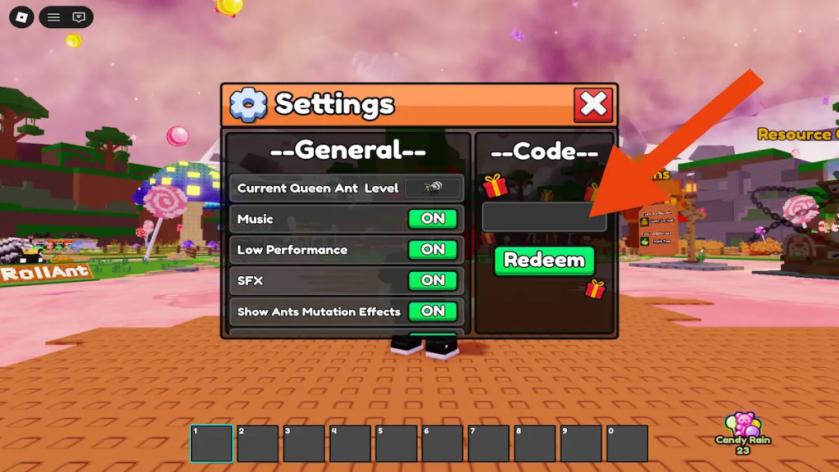
If your menu looks different, use its labels to locate Settings and Code. Finish any tutorial prompt that is still on screen before looking for the menu again.
Why is my code not working?
| What to check | What to do |
|---|---|
| Copied text | Enter only the code, with no quotation marks, leading spaces or trailing spaces. Preserve its case. |
| Code availability | Check the source date and status on the homepage. Reported means a source lists it, not that we verified it in game. |
| Previous use | If the game says the code was already redeemed, check your existing rewards rather than treating that message as proof of expiry. |
| Wrong experience | Use the linked Roblox game page. A similar game title does not share the same code system. |
| No clear result | Confirm the game accepted your button press and read the on-screen message. Do not assume a reward was granted. |
Only the game can confirm the outcome for your account. We do not publish guessed expiry dates, and a failed attempt alone does not establish why a code failed.
What to do after redemption
Read the reward description in game before making a purchase or planning around a boost. Our homepage records the reward stated by each source; it is not a guarantee of the reward shown in your session.
For the normal roll, collect and sell loop, continue with the beginner guide. To try another code, return to the codes list and enter it separately.
Sources & update note
- Pocket Tactics — tutorial and cogwheel/Settings route; updated September 29, 2026.
- Destructoid — Settings, Code and Redeem instructions, plus the credited game screenshot; updated October 4, 2026.
Reviewed and published October 5, 2026. This is a source-based walkthrough, not a record of our own game redemption. Code source-check dates remain separate on the homepage.